REVIEW CARD

1. PRD: Overview, Study & Brief
-
The Objective is to increase the number of organic reviews that we receive from our android app users.
-
This can be done by identifying the happy incidents in the user’s journey of through our app
-
For this we need to create a list of happy moments that could trigger organic reviews
-
Identify the user journey that leads to these happy moments
OVERVIEW
App rating card redesign to give user a hassle free app experience without causing any interruption.
Showcases my deep research and data based design skills.
ROLE & DURATION
UI/UX Designer | Rooter
User Research, Interaction, Visual design, Prototyping & testing
2 Weeks
2. Discover
2.1 Secondary Research (Blogs, Videos etc.)
2.1.1 Things to keep in mind
You can ask users to rate and review your app at appropriate times throughout the user experience. Make the request when users are most likely to feel satisfaction with your app, such as when they’ve completed an action, level, or task.
-
Ask for a rating only after the user has demonstrated engagement with your app.
-
Don’t interrupt the user, especially when they’re performing a time-sensitive or stressful task.
-
Repeated rating prompts can be irritating, and may even negatively influence the user’s opinion of your app.
2.1.3 What are the best possible approaches.
1. Integrated rating requests

-
The trouble with the pop up approach is that the app was inevitably interrupting the user’s experience.
-
A method that’s more integral into the experience is the next step — we call this the integrated rating.
2.1.2 Google’s Android Guidelines for in-app review

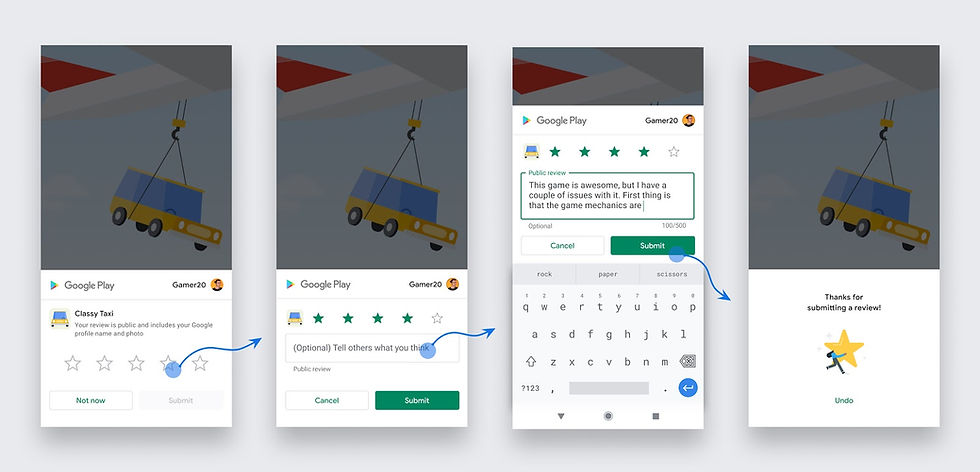
Figure 1: In-app review flow for a user
Design guidelines
-
Follow these guidelines as you determine how to integrate in-app reviews in your app:
-
Surface the card as-is, without tampering or modifying the existing design in any way, including size, opacity, shape, or other properties.
-
Do not add any overlay on top of the card or around the card.
-
The card and the card’s background should be on the topmost layer. Once the card has surfaced, do not programmatically remove the card. The card is removed automatically based on either the user’s explicit action, or an internal Play Store mechanism.
When to request an in-app review
Follow these guidelines to help you decide when to request in-app reviews from users:
-
Trigger the in-app review flow after a user has experienced enough of your app or game to provide useful feedback.
-
Do not prompt the user excessively for a review. This approach helps minimize user frustration and limit API usage (see the section on quotas).
-
Your app should not ask the user any questions before or while presenting the rating button or card, including questions about their opinion (such as “Do you like the app?”) or predictive questions (such as “Would you rate this app 5 stars”).
Quotas
-
Provide a great user experience by enforcing a time-bound quota on how often a user can be shown the review dialog.
-
Be aware that the specific value of the quota is an implementation detail, and can be changed by Google Play without any notice.
-
Apply your own logic and target the best possible moment to request a review.
-
Do not have a call-to-action option (such as a button) to trigger the API, as a user might have already hit their quota and the flow won’t be shown, presenting a broken experience to the user. For this use case, redirect the user to the Play Store instead.
3. Define
3.1 Current Experience Map (Visualisation of user journey and customer behaviours)
Currently we are asking user to review the app on two places.
1. Integrated List Card on our “For You” main feed.
-
The card looks like this

-
If user taps on 4-5 rating we redirect user to Play Store.

-
If user taps on 1-3 rating we ask user “what did he not like?
2. Ask for simple question beforehand
-
Asking for a rating is binary. Users will either rate your app, or they won’t. But the rating itself is not binary — they may still rate your app poorly, such as if they’re annoyed by being asked.
-
Tapping “not really” presents our readers with a different question, specifically requesting their feedback. “Yes” will separately lead them to an ask for a rating.

-
The best part about the above experience is that for those users who are truly not enjoying their experience, they’re giving us their unfiltered feedback.
-
Remember that we still only show this ask after the app has been opened 10 times, over 3 days, and therefore they’re likely to be a somewhat loyal user.
-
If they’re loyal, and not enjoying the app that’s critical to know. The feedback that we’ve received since this has been implemented has been incredible.
3.1.2 Current Quantitative observations
-
The split between the two is following: (Of all people who rate)

-
The split between the two is following: (Of all people who rate)


2. We have a button of “Rate it” on our side nav.

3.2 Hypothesis
Since users who have experienced a happy moment in their journey through our app have a high retention rate, there is a high chance that they will leave a review if they are currently on a path with a high retention rate.
In our app these happy paths are following:
-
After User Likes 3rd Item
-
When user like/reacts on first feed item/reel/ videos/ live broadcast
-
Data shows that users who like at-least single item has 56% D1 retention (& 30% of New user like at least single item)
-
Users who like more than 3 items has 60% D1 retention (& 16% of New user like at least 3 items)
2. After user collects coin , completing his “x” task
-
Data shows that new users who collect coins after doing a task has 66.4% D1 retention ( 20% of new user goes through this path)

3. After user watches “x” number of Reels
-
Data shows that our 60% new users watch reels
-
48% new users watch 5+ reels on the same day ( and it gives out D1 retention of 50%)
-
Along with that 32% new users watch 10+ reels on the same day ( and it gives out D1 retention of 56%)
4. After user watches “x” number of Live Broadcast
-
Data shows that our 60% new users watch reels
-
36% new users watch 5+ live streams in 30 days ( and it gives out D1 retention of 68.2%)
-
Along with that 18% new users watch 10+ live stream in 30 days ( and it gives out D1 retention of 77.2%)
5. After user redeems his first reward
-
Retention of users who has interacted with rating card

This could tell us that high-intended users are most likely to rate the app.
4. Design
4.1 High fidelity mockups

-
Funnel of new users who are rating us

-
Number stays constant at 1.41% for all users
3.4 Things to keep in mind
-
If user has already rated once, dialogue should never appear again in his journey
-
Duration between forced prompts to rate app should be once in around 2-3 days
-
Forced prompts should appear after user is completely done with the task.
-
Audio should automatically be muted if user has a prompt and auto-play is taking place in the background